AI automation
Human review in AI automation: when a person should check
· 4 min read
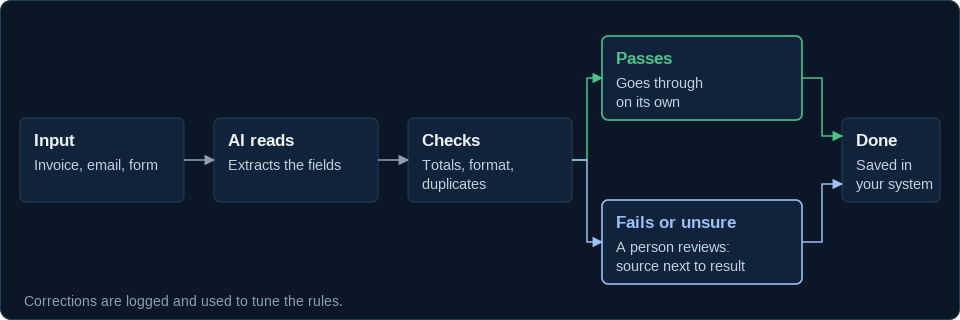
An AI automation should pass work through on its own only when two things are true: rules can check the result, and a mistake is cheap to undo. In every other case a person should look first. In practice that means a review step built into the workflow, with clear rules for what goes to it, and not a person who is expected to notice problems after the fact.
Human review is not a sign that the automation is weak. It is what lets you use a model on messy input without trusting it blindly.
Why a model needs a reviewer
A language model can return a value that looks right and is wrong. It can read an amount with confidence, swap two dates or answer a question from information it was never given. It does not reliably know when it is wrong. Rules and people catch what the model does not.
Plain rules-based workflows have a different weakness. They do exactly what they were told, including on data they were never designed for. A review step covers that as well.
What should go to a person
Not every item needs a look. Send an item to review when one of these is true.
- A check failed. The net and VAT do not add up to the total, a required field is empty, a record already exists.
- Confidence is low. The model, or the step that reads the document, reports low confidence on a field.
- The sender or case is new. The first invoice from a supplier, the first message from a client, a document type the system has not seen.
- The stakes are high. A large amount, a legal or contractual commitment, a message to a client that cannot be recalled.
- The step cannot be undone. Sending an email, paying, deleting, changing a record in an external system.
- The input is unusual. A very short document, a very long one, a language you did not plan for.
Thresholds such as “large amount” are your decision, not the vendor’s. Write them down with the person who owns the process.
Review before, review after, or both
There are two places to put a person, and they do different jobs.
Review before the action is an approval. The automation prepares the work, and nothing leaves until a person approves it. Use it for anything outward-facing or irreversible.
Review after the action is a sample check. The automation acts, and a person looks at a share of the results, or at all of them for a trial period. Use it for low-risk steps where a mistake can be corrected, and to learn how well the automation really performs.
A common pattern is approval for everything in the first weeks, then approval only for the cases above, with a sample check on the rest.
What a good review screen shows
A review step fails when it is slow. Whoever reviews should be able to decide in seconds.
- The source and the result side by side. The original document or message next to what the automation extracted or drafted.
- The reason it is there. “Total does not match net plus VAT” is more useful than a red flag.
- Editing in place. Correct the field on the same screen and approve.
- Clear outcomes. Approve, correct, reject, or pass to a colleague.
- A record. Who changed what, and when.
Use the corrections
Every correction tells you something. If the same field is wrong for the same supplier every week, fix the rule or the instructions and the item stops reaching the queue. If a type of case is always approved without changes, you can let it through automatically. Review the corrections regularly, monthly at first, and adjust the thresholds.
A queue that never gets smaller usually means the rules were never tuned, not that the model is poor.
Measure the review step
Three numbers show whether it is working.
- Share of items that need review. It should fall as you tune the rules.
- Time per reviewed item. If this is close to the time it takes to do the work by hand, the screen or the rules need work.
- Wrong items that passed without review. Find them through sample checks and downstream errors. This number should stay as close to zero as you can make it.
Also decide who is accountable
Someone must own the queue. Without a name, items wait, and the automation slows the process it was meant to speed up. Decide who reviews, what happens when they are away and how long an item may wait before someone is alerted.
Next step
If you want to see where review belongs in one of your own processes, request a free 30-minute automation audit. We map the process with you and mark which steps can run alone and which need a person. Our page on AI workflow automation explains how we build it.